Showing posts with label Lori Whitlock. Show all posts

Friday, February 14, 2014

History of Ever Valentine's Card & Tip on Gluing Die-Cut Letters Perfectly Straight

Happy Valentine's Day!

I am so excited to be back on my blog sharing a project.  It has been a few months - I was crafting while I was away from blogging, so I will be sharing more projects soon.

I was shopping in the Silhouette Store and was very inspired by Lori Whitlock's You're My Favorite Phrase Cut File.  It is such a sweet and fun Valentine's Day sentiment!


I cut the sentiment out with black cardstock using my Silhouette.  I glued the black letters on vellum so I wouldn't cover up the background of the card.  You may be thinking....wouldn't it be easier to print the sentiment on vellum?  Probably!  :)  But, I thought about it, and I love the layering effect and texture you get with die-cut letters especially on vellum.  

To ensure the black letters were glued perfectly straight on the vellum, I used the black cardstock negative from the die-cut to position and glue the letters.  This technique also keeps the glue behind the letters and not all over the vellum!  Use a paper clip to the keep the vellum and negative in place.

Once you have glued all of the letters in place, remove the black cardstock negative.  Make sure to do this slowly so you don't remove any of the letters with it.


I am love with maps right now, so I had to use a map as the card background.  The 'map' paper is by October Afternoon pulled from my stash of the Seaside collection.  I added some little red die-cut hearts to the red lines on the map and I splattered pink ink (Pink Balloon Sprinkler by October Afternoon) for more color.


To finish the card, I added a little pennant with paper from the October Afternoon Cakewalk collection and a sweet little wood heart by Freckled Fawn (added a little red sequin to the center!).  

Here is a angled picture showing the lovely layering on the card!  From the little red hearts, vellum, the die-cut letters, and the pennant.  


I LOVE the way the layering turned out!  I hope you all have a very Happy Valentine's Day and thanks for stopping by!

Melanie

For Bloglovin' Fans:
Follow my blog with Bloglovin

Sunday, September 8, 2013

My Stache!

Sunday was a great day!  I spent the day with my family celebrating my nephew's birthday - he is now 10 years old!!!!  Boy, he has grown up fast!  I made him a fun mustache card and mini box for his birthday.  The 'stache' box holds all the money he got for his birthday - get it "my stache!"  :)


To create the card, I used Lori Whitlock's Mustache SVG Set.  I left the mustaches in the same order they were in the SVG file making it so easy to create the card!  I resized the SVG file to fit a 4.5x5.5 card, cut it out on white card stock, and then pasted strips of patterned paper behind some of the mustaches.  You may be asking, what collection is the adorable paper from?  Well, it is the Swagger Collection by Fancy Pants.  Absolutely love this collection and all of the 'staches' in it - I definitely pulled inspiration from it!

To create the mini box, I used Lori's Mustache SVG set again as well as Lori's Ghost Window Box.  In SCAL, I removed the ghost from the top of the box and added 3 mustaches to create a fun die-cut pattern on the top of the box!  Once I assembled the box, I added some white card stock to the back of the top of the box to make the mustaches pop.  To finish off the box, I added a button from the Swagger Collection with the perfect sentiment on it and added two strips of paper underneath the button to make it look like a ribbon.

My nephew definitely loved these (my sister may have loved even more)!!! 

I hope you'll have a great week!

Melanie

Thursday, December 13, 2012

A Country Christmas Village & Tutorial on Homemade Snow! Guest Designer at Lori Whitlock!

Hey there!  I have a wonderful project to share with you today!  I hope you love it, take some inspiration from it, and/or make one of your own!

I am the Guest Designer over at the Lori Whitlock blog today!


If you are not familiar with Lori Whitlock, she designs very professional SVG files, Echo Park paper, and digital scrapbooking kits available at Jessica Sprague.  She is extremely talented and I love that she designs so many fun 3D SVG files.  I had a very hard time picking what I was going to make from her store!

To forewarn you, I have lots of photos below.  I added lots of tiny details to this project and want to show you every inch of them!  I hope you can bare with me!  Also, at the bottom of this post, I have a tutorial on how to make your very own snow for your projects using materials you should have around the house!

Okay, enough with the introduction.....here is my project!  A Country Christmas Village!


I couldn't resist making the 3D Christmas Village by Lori Whitlock!  I know lots of people have been sharing villages they have made recently and they are all so adorable.  I wanted to present something different so I challenged myself to make each building look like it was not made of paper (and they are of course!).  I pictured the ceramic villages you can buy at the store that my mom has so many of!

Here are a couple pictures of the village all lit up!


It is really pretty at night as the light from our Christmas tree reflects off the glitter and trims on each building. 

To light up the village, I put flameless votives inside each building through the opened doors except for the cottage as the door is too small.  I will show you how I put the votive inside the cottage below.

Now for all of the tiny details I added to each building in the village!  First up, The School House:


There are only pine trees in my village, so I thought it was appropriate to give the town the name "Pine Hill!"  It sounds country too, which I like!  :)  The pine trees are SVG files by Lori Whitlock -  3D Christmas Tree #3 and 3D Christmas Tree #5.

I used the curved banner label from the 14 Labels SVG set to add the school name above the school's door.  It worked perfectly!  I sized it to 2.239" wide by 0.741" tall.  I printed the name out first, then cut the label out using the Print/Cut feature in SCAL.

To create the wreath on the school, I first created a base using two punches from Stampin' Up!  First, I punched out a 1/2" circle into my cardstock.  Then, I centered the largest flower from the Boho Blossoms punch around the punched circle to create the wreath's base.  Then, I glued holly leaves from Lori's Christmas Icons Set 2 to the base.  To finish the wreath, I added some red rhinestones.


To add more holiday decor to the school, I used garland trimmings I found at Michael's.  I applied the garland around the school door and created scallops around the school windows.  I added Lori's holly leaves and red rhinestones to dress-up the garland.


The tower on top of the school was made for a bell (so stinkin' cute, right!) - I found some small metal bells at Michael's in the holiday decor area.  I hung the bell in the tower using gold crafting wire which I adhered to the top of the tower using a hot glue gun.


And there is a little surprise inside of the school house.  The back wall of the school house has a black board with a message that reads:  "See you in the new year!"  My teachers always said that when school was out for the holidays!


Next up, The Church:


To give the windows of the church a stained glass look, I stamp embossed onto vellum using the Lattice Background stamp by Unity Stamps for Jillibean Soup and gold glitter embossing powder by Martha Stewart Crafts.  I love the way the windows turned out!!!!


To add texture and color to the cross in the window, I applied glitter glue in gold by Martha Stewart Crafts.


There is a bell in the steeple too!


For the final touch, I created a standing sign with a message board for the church.  I thought the message "Merry Christmas" was perfect for the sign.  I added some snow, glitter, holly and rhinestones to embellish the sign.


Last and not least, The Cottage:


This is where my husband and I live in the village!  We are the only residents in Pine Hill!  LOL! 

I included our last name and a house # on the cottage. I used another label from the 14 Labels SVG set for the house # and accented it with rhinestones.

I created a wreath for the door using the garland trim I used on the school (I wrapped it around my glue pen to give it the circle shape).  Then added some gold sequins to it.  I love the silver/gold combo!


I used the 3D Christmas Tree #5 SVG by Lori for the Christmas tree in the window. I decorated the tree using red and silver rhinestones and some gold sequins trim I found at Michael's.   I used my hot glue gun to glue the tree in place inside the cottage.


Since I couldn't add real lights to the outside of the cottage, I added this rhinestone trim by Simplicity.  I applied the "lights" to the roof of the cottage and the top of the fireplace using a hot glue gun.


To turn on the flameless votive inside of the cottage, I left the back of the roof open - meaning I didn't glue the back side of the roof down.  Sneaky, ay?  ;)


Did you notice the super adorable scalloped shingles and the snow on the roofs and trees?????  And, the doors - the beautiful wooden doors!!!  I used 'Boardroom' patterned paper from the 9 to 5 collection by October Afternoon!  These were my favorite, favorite adds!  Lori had made the villages so adorable already, I wanted to add something too!  To create the shingles, I used the scalloped border SVG from the Simple Borders set.  This was time consuming, I can't lie, and so worth it!  I cut out about 60 of these borders, then curled them up around a pen (so they stick up more), and then glued them down individually, one after the other, to the roofs.  Once the villages were complete, I added some homemade snow!

One more thing that I almost forgot to mention and it is an important tip!  To make each village very sturdy, I created them using lightweight chipboard in white.  This is why the inside of each building is white.  I glued the colored cardstock to one side of each of the chipboard pieces prior to assembling the buildings.

Thanks for looking at my village!  Below is a complete list of the materials I used for this project as well as a tutorial on how to make snow for your projects!

Materials Used:
SVGs by Lori Whitlock (see above for specific SVG files)
Lightweight Chipboard in White
Brown Cardstock by Core'dinations (Shingles)
White Cardstock by Bazzill Basics (Trims)
Artichoke Cardstock by Stampin Up (Trees)
Other Cardstock by Recollections (Michael's brand)
Vellum Paper (Church Windows)
Gold Glitter Embossing Powder by Martha Stewart Crafts (Church Windows)
Lattice Background Stamp by Unity Stamps for Jillibean Soup (Church Windows)
9 to 5 Boardroom Patterned Paper by October Afternoon (Wood Doors)
Boho Blossoms and 1/2" Circle Punch by Stampin' Up! (Base for School Wreath)
Silver Sequin and Gold Sequin Holiday Trims by Celebrate It (Michael's brand)
Miniature Gold Bells by Celebrate It
Rhinestone Trim on the Cottage by Simplicity
Rhinestones by Creative Charms
Crystal Glitter Large by Creatology
Mini Shimmer Alpha Stickers in Red by Making Memories (Church Sign)
Silver and Antique Gold brads by Making Memories (Doorknobs)
Styrofoam, White Felt, and Eco Flurries (Snowy Village Base)

Make Your Own Snow!

Materials Needed:
Baby Powder or Talcum Powder
Crystal Glitter (Larger Course Glitter)
White Glue - Elmer's or Scotch Quick-Dry Adhesive
Spray Adhesive
White Acrylic Paint
Paint Brush or Wood Popsicle Stick
2 Plastic Containers for Mixing Ingredients
Newspaper (2 different placings - one for powder mixture and one for glitter)

Instructions:
1) Create a mixture of 1/2 cup baby powder and 1/2 cup course crystal glitter in a plastic container.  Set the powder mixture aside. 

2) Mix equal parts of white glue and white acrylic paint together in a plastic container using a paint brush or wood popsicle stick.  There is no set amount you need to make at one time as you can make as little or as much as you would like.  If you want to make a lot of the glue mixture at one time, I recommend putting it in a container with a lid so you avoid the glue drying before it is applied to your project.

3) Apply the glue mixture to your project liberally using a paint brush or wood popsicle stick. 

4) Put the project on top of some newspaper and apply the powder mixture liberally to the areas where the glue was applied.  Let the powder sit on the glue for a few minutes.  Then, shake off the excess powder onto the newspaper. 

5) To add more texture and shine, I recommend putting the project on top of some new newspaper, then apply a spray adhesive.  Immediately apply glitter to the sprayed areas.  Shake off the excess glitter onto the newspaper.

Here is what the finished snow should look like on your project:


To clean-up, use the crease in the newspaper to gather the extra powder and/or glitter and dump them into their respective plastic containers.

It will take about 24 hours for the snow paste to dry.  Avoid handling your project during this time.

Thanks so much for stopping by today and thank you Lori and Lisa for having me as a Guest Designer on the Lori Whitlock blog!  I had a lot of fun using your SVG files and feel very honored that you asked me!

Mel

Tuesday, October 30, 2012

Halloween Inspiration & Some Exciting News!

I was visiting my friend Carrie this past week and I just couldn't stop thinking about how cute her house was decorated for Halloween.  There was a particular decor project that I just loved and it is so simple to make! 

Check it out below!  Isn't this the cutest! 

 
To make this, she bought some twigs, burlap, and a string of orange lights at a local arts and crafts store.  She cut out moons and stars on her Cricut and attached them onto the twigs.  Then, she wrapped the lights within the twigs, placed some burlap around the base of the arrangement and placed them into a super cute jar that she had.  I don't know about you, but I am making one of these!!!!  You could put a Christmas spin on this too - maybe stars and snowflakes?
 
Thanks to my wonderful friend Carrie for letting me share her project!  She doesn't have a blog, so if you want to leave her some love, please leave a comment on this post. 
 
I have some exciting news to share today too!  I will be guest designing on the Lori Whitlock blog in December!!!!!  I am beyond excited - I LOVE playing with Lori's SVGs!  I recently shared a Halloween shadow box that I made using Lori's SVGs.  The shadow box itself is an SVG (and yes, made of paper!).  Check it out here!  Also, if you are not familiar with Lori Whitlock products, check out her site here.  She designs SVGs, paper for Echo Park, and digital scrapbooking kits at JessicaSprague.com.
 
Tomorrow is going to be a busy day with my husband getting Lasik eye surgery and Halloween and all.  I hope you all have a fabulous, spooky, and fun Halloween! 
 
Mel

Monday, October 29, 2012

Haunting Monsters Shadow Box!

Halloween is only a couple days away!!!!  Today I was given the okay to share a spooky shadow box I made for the first issue of Cutting Edge Magazine!  The second issue of the magazine will be coming out in a couple days! 

My husband and I met while we worked together at a family amusement park.  Towards the end of the season, we would get to dress up as Monsters, walk around the park, and entertain the guests.  Most kids loved us, but some of the younger ones would get scared by us - even if we were friendly and wanted to give them a hug!  :)  To display these memories, I decided to use Lori Whitlock's SVGs and make a shadow box my husband and I can enjoy during the Halloween season. 


Here are some close-ups so you can see all of the details better!


I love the peeking ghost I added to the picture!  It reminds me of the end of the Haunted House ride at Disney World where the ghost is riding with you.


The paper I used is from a digital kit, Trick or Treat Paper Pack by Sara Schmutz, available at Design House Digital.  DHD has super cute papers and you can get what you want right away - just purchase online, download and print!

SVGs by Lori Whitlock:
11.3x11.3 Shadow Box
Tombstone - Halloween Set 1
Tombstone Background, Corner Web and Ghost - Halloween Embellishments 2
Jack-o-lantern and Bats - Halloween Words
Hanging Spider - Halloween Icons
Halloween Label

Other materials:
Frightmare Font by Lettering Delights
Victorian Border Die by Papertrey Ink
Banner Dies by Papertrey Ink
Letter Dies by Papertrey Ink
Circle Punches by Stampin' Up!
Ribbon by Prairie Bird Boutique
Twine by The Twinery
Googly eyes by TPC Studios
Cardstock by Recollections

In case you missed my earlier post today, I am featured on the ScrapFIT blog today.  Check it out HERE and learn more about me!  I will be back before Halloween with another project or two to share!

Mel

Monday, July 30, 2012

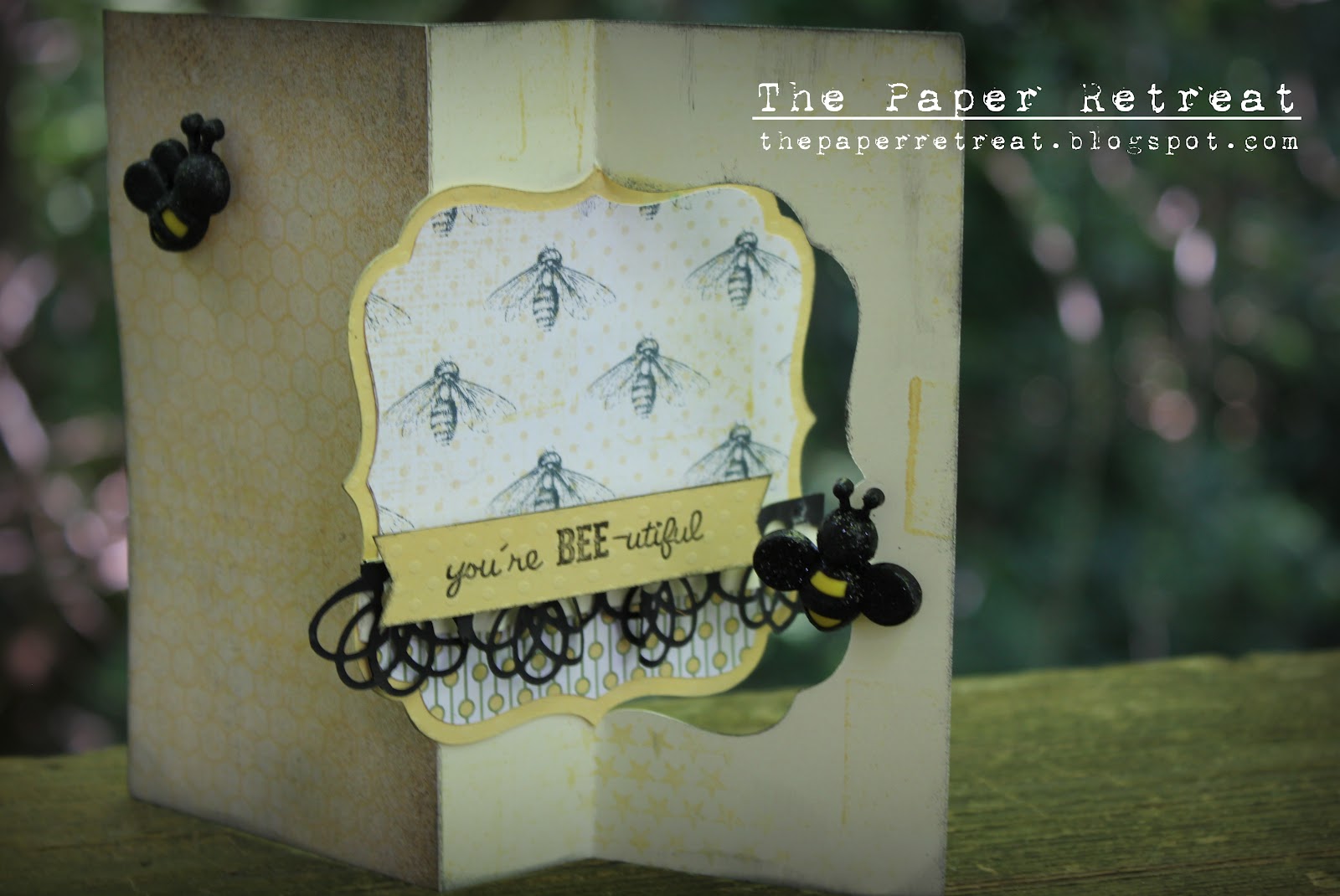
You're Bee-utiful & TPR Giveaway!!!!

Happy Monday!  Today I have created a fun card to give someone special in my life.  She is the sweetest grandma ever, so, I made a card for her to show my appreciation! 


To make this card, I used Lori Whitlock's Flip Swing Bracket Card SVG (link HERE).  Isn't this a super fun SVG to play with!  I made my BEE-utiful (bee themed) card with these other fun materials:

Cardstock & Patterned Paper by Stampin' Up!
Yellow Cardstock by Baazzil Basics
Sentiment stamps by My Thoughts Exactly
Bee embellishments by Recollections
Border die by Papertrey Ink
Star background stamp by Unity Stamp Co.
Ink by Stampin' Up!

Now for the FUN!!!!  It is GIVEAWAY time at The Paper Retreat!  To celebrate my new name and updated blog, I am giving away a pile of embellishments from my craft stash!!!  Yippee Yippee Joy Joy!!!!  I have used many of these embellishments in my projects and know you would love to get your hands on these too!  There are embellishments from Prima (package of 6 flowers), Creative Charms, Autumn Leaves, Maya Road, My Minds Eye (package of Everyday Fun embellishments), just to name a few!  I even included one of the bees I used for my card above!

UPDATE!!!!  How would you like to win more goodies????  If more than 50 people enter this giveaway, I will be sweetening the pot with a My Mind's Eye 6x6 paper pack.  If more than 100 people enter the giveaway, I will be adding 3 ink pads and a 12x12 patterned paper pad from Stampin' Up!.


To enter the Giveaway, please like my new Facebook page at http://www.facebook.com/ThePaperRetreat and leave a comment on this post!  That's it, really easy!!!!  If you want to earn an EXTRA CHANCE, spread the word about my giveaway on your blog and/or Facebook page (and make sure to mention it in your comment)!  The giveaway will end on August 11th at Midnight CST!  Good Luck!

I am entering my card into the "A Flair for the Electric" blog party at Paper Issues.  They have an awesome giveaway too!  Check it out HERE.
Mel

Wednesday, October 12, 2011

Halloween Gift Box Challenge!

I decided to enter the halloween gift box challenge over at Happy Life, Crafty Wife, for a couple reasons.  One, I absolutely love these boxes created by Lori Whitlock, and two, I felt inspired after seeing some really fabulous boxes made using these files.  So, here I am sharing the box I made when I should be getting some Z's!  :)


I love the spider web on the top of the box!  To compliment the spider web, I put a piece of paper just under the top (adhered using foam squares) so the web looks 3D.  Also, I added this adorable spider from the Halloween Town SVG set by The Digi Bistro.  He is hanging by some twine (from The Twinery) and sits on the top of the box quite nicely in the grooves of the spider web.  I made him all fuzzy using flocking powder and I used different sized pearls for his eyes. Also, I wanted to add texture to the box, so I layered 3 different ribbons around the trim of the top of the box.

I hope you have enjoyed my project!  Have a crafty week!